
 Mastersdaily Represents SEO optamization.
 Just Think About Best SEO and Offline Data Entry Services in Bulk its only in Ahmedabad here with us..
 Just Our Services and Clients enjoys best Services in Gujarat.
 Just SEO Rocks With Online Marketing.
 what u expect from us Contact us email us: jetmaster007@live.com.
 Posts filed under address use
MAC address of your computer in Windows XP
A MAC address is usually your computers unique hardware number. You don’t have to use it on your own. When you are using a network connection an IP address is assigned to your MAC address in the router. It’s also sometimes called your Ethernet address. Your wireless Internet connection may get connected faster upon restart if you have manually entered your MAC address in the router configuration.
In Windows XP there are multiple ways you can find the MAC address of your computer. The simples method is:
Navigate to Command prompt.
Type: ipconfig /all
and this brings up such kind of information:
Type: ipconfig /all
and this brings up such kind of information:
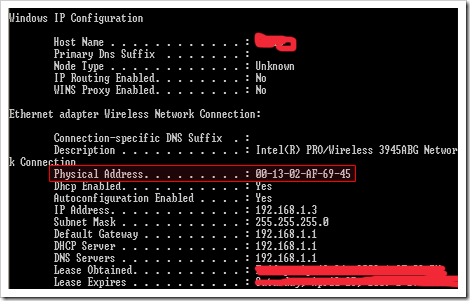
The physical Address is your MAC address.
If you are not comfortable using the command prompt, in Windows XP you can also find your MAC address in the following manner:
* On your Desktop, click Network Connections
* Right-click on the network connection you are currently using
* Click Status
* In the window that comes up click the Support tab
* Click the Details… button
* Right-click on the network connection you are currently using
* Click Status
* In the window that comes up click the Support tab
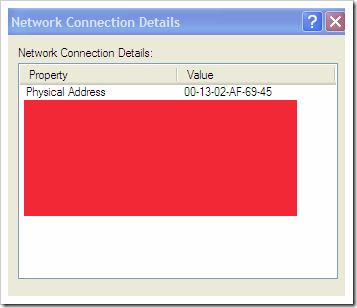
* Click the Details… button
The Physical address is the MAC address.


 Subscribe to our RSS Feed
 Follow Us on Twitter
 Become Our Fan on Facebook